


Read The Bleepin’ Manual
Your Bleepin' Toolbox
 The actions menu lets y'all pick what happens when you mash a foot pedal or tap your screen like a crazy person.
Nope
Set the action to Nope & nothin' happens when the input shows up. Revolutionary, amirite?
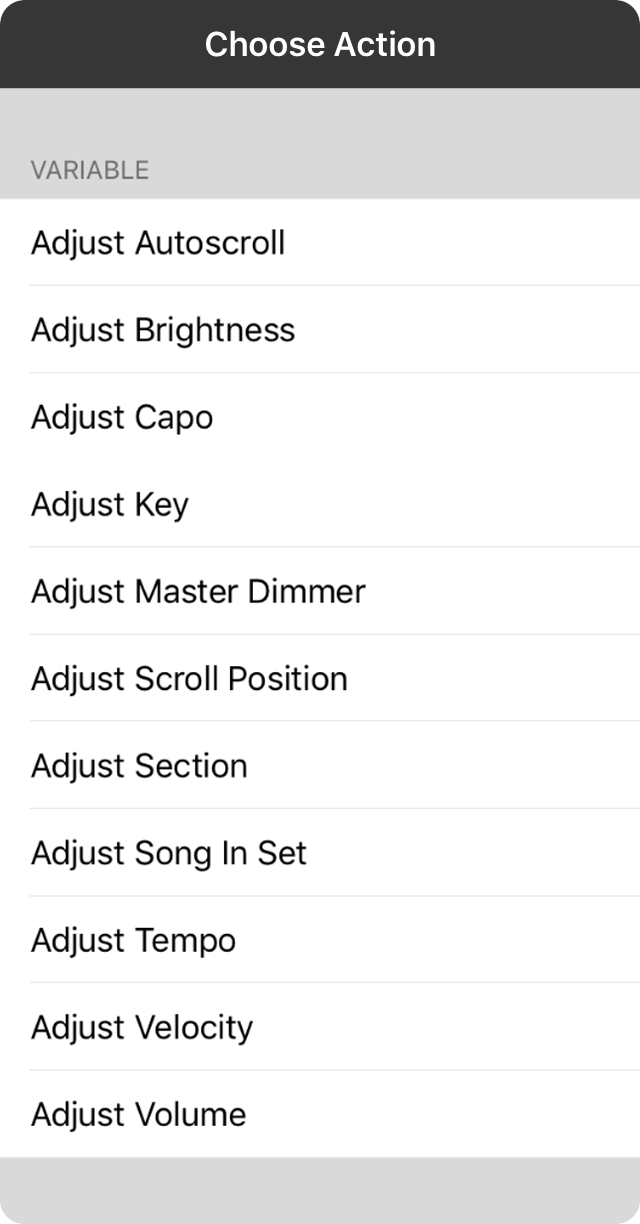
Slider Vibes
Slider vibes are what happens when you twist a MIDI controller knob or stomp on an expression pedal like you mean it. The numbers show up on screen but won't actually DO anything 'til the knob stops changin' for a hot second.
- Adjust Autoscroll keeps messin' with the autoscroll speed from 0 to 15 minutes (because apparently we needed that many options).
- Adjust Brightness keeps tweakin' the screen brightness from 0 to 100% (squint or go blind, your choice).
- Adjust Capo keeps fiddlin' with the capo from 0 to 11 frets (for when you can't make up your mind).
- Adjust Key keeps changin' the key usin' the transpose slider in the Vibes Prefs Menu (we call it that now).
- Adjust Master Dimmer keeps messin' with the master dimmer for lightin' in Scenes (dark & moody, much drama).
- Adjust Scroll Position keeps movin' the page from top to bottom & back again (endless scrollin', sounds about right).
- Adjust Section keeps jumpin' through sections from the tip-top to the very bottom (section hoppin').
- Adjust Song In Set keeps scrollin' through your songs in the current set (infinite playlist anxiety).
- Adjust Tempo keeps changin' the tempo from min to max as defined in settings (speed racer mode activated).
- Adjust Velocity keeps changin' how hard OnSong smacks those MIDI notes (aggressive piano energy).
- Adjust Volume keeps messin' with the volume from 0 to 100% (neighbor relations: declining).

One & Done
One & Done actions happen with a single tap or pedal press. These are the biggies:
- Capo Up cranks the capo up one fret (gettin' higher, literally).
- Capo Down drops the capo down one fret (comin' back down to earth).
- Scroll Up scrolls the song up like you're readin' an actual book. Hit the top? Foot pedal jumps to the previous song (magic!).
- Scroll Down scrolls the song down like a normal person. Hit the bottom? Foot pedal jumps to the next song (also magic!).
- Next Song jumps to the next song in the set (onward & upward).
- Previous Song jumps back to the previous song (whoopsie, lemme rewind).
- Random Song loads a random song from your current book or set (Russian roulette but make it musical).
- Reset Song scrolls back to the top & optionally resets all those toggles like autoscroll, backing tracks, metronome & section assignments. Customize this hot mess in Settings » Navigation Settings » Actions » Reset Song.
- Next Slide moves to the next slide when projectin' lyrics (keepin' up with the words, fancy).
- Previous Slide moves back a slide when projectin' lyrics (oops, rewind that verse).
- Next Timeline Event jumps to the next event in the Timeline (time travel, basically).
- Previous Timeline Event goes back to the previous event in the Timeline (back to the future energy).
- Show/Hide Menubar toggles that menu bar on & off for full screen vibes (immersive, y'all).
- Show Quick Pick pops up the Quick Pick screen for speedrun song searchin' (efficiency unlocked).
- Show Songs List shows & hides the song menu (now you see it, now you don't).
- Scroll Faster shrinks the song duration by 30 seconds so autoscroll zooms (GOTTA GO FAST).
- Scroll Slower stretches the song duration by 30 seconds so autoscroll chills (slow jam mode).
- Start Audio starts blastin' the backin' track for the current song (let's go!).
- Start Autoscroll begins autoscrollin' the song (hands-free livin').
- Start Metronome fires up the metronome at the song's tempo (tick tock, keep the beat).
- Stop Audio kills the audio if it's playin' (silence is golden).
- Stop Autoscroll pauses autoscroll whether it's linear or timeline chaos (pump the brakes).
- Stop Metronome shuts down the metronome (no more clickin').
- Toggle Audio play, pause, or stop the backin' track (all the power in your hands).
- Toggle Autoscroll starts or pauses autoscroll (on/off switch for lazy hands).
- Toggle Capo turns the capo on or off (to capo or not to capo).
- Toggle Low Light Mode flips low light mode (black background with white text = your eyes' best friend).
- Toggle Metronome turns the metronome on or off (clickety-clack or blissful silence).
- Toggle MIDI Clock starts or stops sendin' MIDI clock events to sync tempo between devices (MIDI besties).
- Toggle MIDI Start/Stop sends the MIDI start or stop command (remote control energy).
- Toggle Transpose turns the transposition engine on or off (transpose life, baby).
- Mute Metronome mutes the metronome but keeps it clickin' silently & optionally blinkin' the menubar (practice mode: hardcore).
- Tap For Tempo lets you tap the tempo into the current song (don't use this on laggy foot pedals like the AirTurn BT-105 — they already forgive your clumsy foot work).
- Tempo Up cranks the tempo up by 1 BPM (speedy gonzales).
- Tempo Down drops the tempo by 1 BPM (slow & steady).
- Transpose Up shifts the song up one half step with all the fancy enharmonic stuff (goin' up, up, up).
- Transpose Down shifts the song down one half step with all the enharmonic goodness (comin' down, down, down).
- Volume Up bumps the master volume up by a sixteenth (gettin' louder).
- Volume Down drops the master volume by a sixteenth (shh, be quiet).
- Blackout Lyrics blacks out the lyrics for projection by hidin' 'em & removin' the background (total darkness mode).
- Clear Lyrics shows or hides the lyrics during projection while keepin' the background image or video (aesthetic choices).
- Continue Scene keeps playin' a scene if a step has infinite duration (for the advanced folks who like a lil' chaos).
- Play Scene restarts the currently loaded scene (let's do this again!).
- Stop Scene stops the scene that's playin' (all good things must end).
- Toggle Scene Playback toggles whether the current scene is playin' or paused (pause/play for scenes).
- Playback Pitch plays the pitch for a cappella groups (singin' without a net, baby). Configure this with metadata.
- Shift Up shifts to the next gear in your configured gears (upgrade your gear, champ).
- Shift Down shifts to the previous gear in your configured gears (downshift, literally).
- Unshift shifts back to the first gear in your configured gears (reset to factory settings, gear-wise).
- Send Message lets you pick a message to send to connected devices (reach out & touch someone).
- Send MIDI when you've got the MIDI in-app purchase (fancy!), this lets you define a MIDI command to send (MIDI wizardry).
- Switch Scene maps a specific scene to an action (blackout all the lights or bring the house lights up, your call).
- Switch Section links an action straight to a named section in your song (jump to "Verse 1" or "Chorus" on command).
- Switch Song lets you jump to a particular song in your library when triggered (song teleportation, go!).
OnSong 1.999 — Last Refreshed October 25, 2018


